Picasso
Moderators
-
Joined
-
Last visited
Everything posted by Picasso
-
Sounds like when they jet washed they have damaged the abs wiring or abs ring built into the hub
-
Hi rus the remote don't look correct for the alphard what's your reg no. Or vin
-
You need toyota techstream software
-
https://www.ebay.co.uk/itm/333501651219. This one will work with your alphard
-
I have toyota techstream software it's what toyota uses have it on a laptop can read all toyotas
-
yes that's not a problem on the 20th this month im going Southampton i pass oxford i will message you see if you want it still reading and if you do will meet up
-
if you had been nearer to Coventry could had read it for you
-
Just under the steering wheel lower down towards peddles
-
Adt32108 is 3.0 alphard you need adt32112 for 2.4
-
Bought from my local coventry toyota dealer
-
hi the seats don't completely come forward to have the seats go flat you need to turn the seats round then drop the back of the seat forward
-
Need any part no.s just ask
-
Cheaper in amazon
-
Hi your toyota no. Is. 4431028240. Try it in ebay
-
Hi what's your reg no. I will get oe no. For you
-
Going to need a can bus chip younger models upto 2008 use a ckun09 chip
-
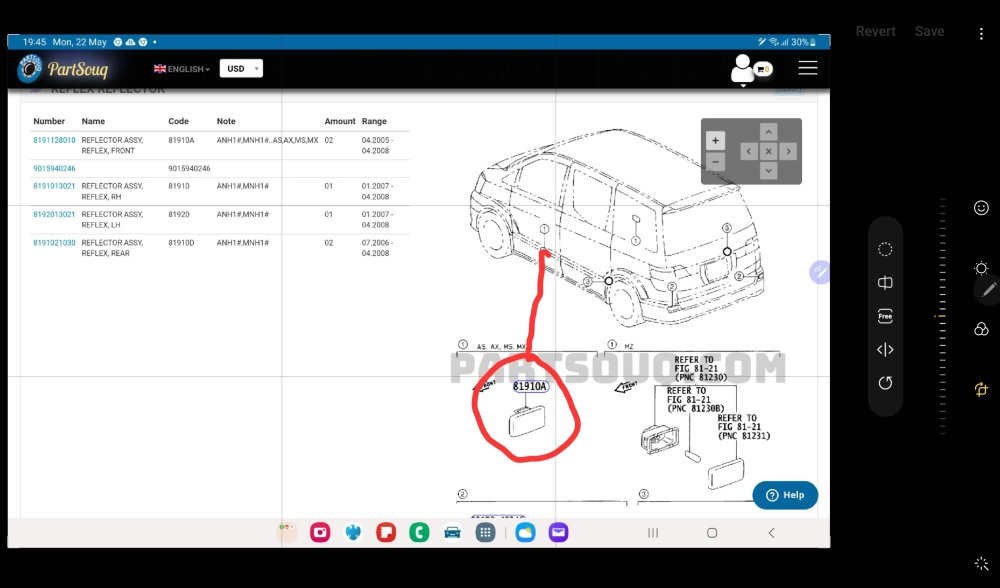
The part no. Is 8191128010 if you need any other no.s just ask
-
What's your reg no.
-
They are available toyota I bought one myself 2 days about £10.00
-
Could be door motor cable jamming
-
That's normal it's just letting you know it's immobiliser is active
-
Check your battery connections they might seem tight had similar problem bumped up kerb and would not start windows reset and clock rac came out and tightened battery loose connection
-
bosch no.s AR16U AR26U
-
No there is 4 bushes rack will need dropping to do it
-
Steering rack bushes need replacing