Nanoshock
Members
-
Joined
-
Last visited
-
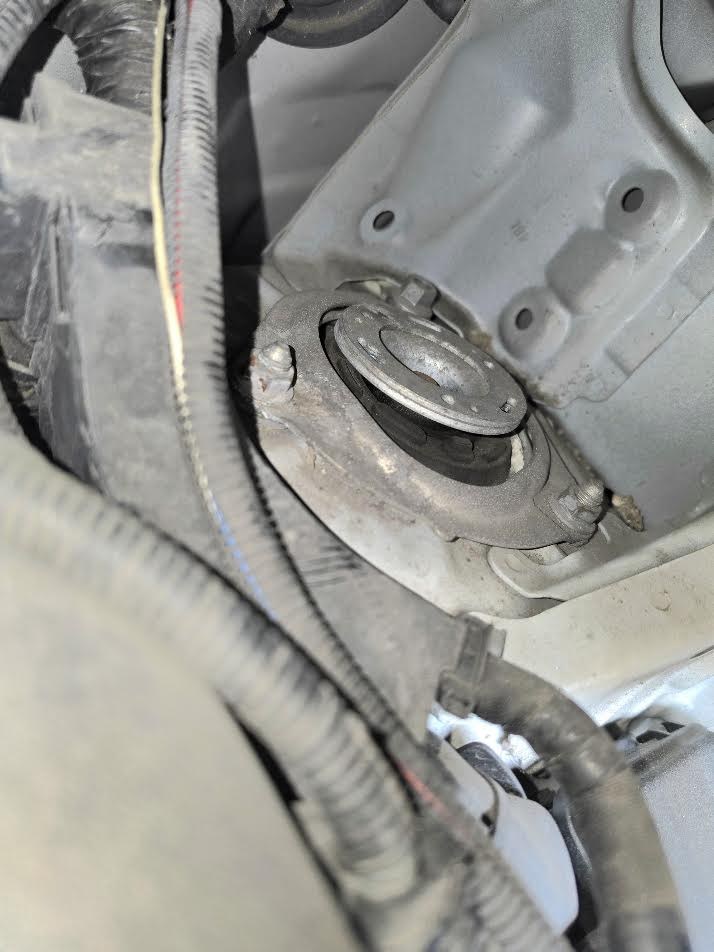
I haven't specifically looked there yet but I did notice last time I jacked it up that the mounts in the picture previously were nice and tight to the top mount cup when the car wasn't on the floor, I'm away for a few days now but once I'm back I'm planning on slapping a camera in the engine bay pointing at the passenger side top mount while I go over some bumps to see how much it moves.
-
While it likely will need doing in the near future, the clunking i hear is distinctly from the left and right, if it was coming from the same place each time it would be more likely to be the steering damper, it does "clunk" when turning left and right, but only very slightly, I have one purchased already and ready to install when I get some good weather and some spare time, but I don't think the majority of the clunking I am hearing is from this (due to it being very clearly sided clunking) As its air suspension the top mounts are likely somewhat different to the stock struts, I stuck my phone in and took a picture, does this look right to you?, is it worth me trying to tighten the centre nut?, the overall condition of the air suspension units themselves (everything inside the wheel well) and the visual look of its rubber components look very new and in good overall condition. It's just the gap between this rubber and the metal cup that's throwing me. After some digging it looks a while lot like an OEM part bolted to the top of an air strut, I have proactively emailed BOLD WORLD with my shocks model and serial number to see if it is indeed an OEM top part, hopefully it is as with it being an air strut it should be fairly straight forward (and safe) to replace. As a side note, I thought the back bolt was loose, but inspecting it further, it just a different bolt from the others and is tight.

-
So since we got the car, (2010 vellfire 2.4) the front left and front right makes a knocking sound when going over bumps, sometimes once or twice and sometimes several in very quick succession, the vehicle has air suspension, and this sound doesn't really change in pitch or how often it happens regardless of how high or low the car is set up, I had initially thought drop links because the noise I hear sounds all the world like a worn droplink, so I installed new ones and the sound didn't really change, inspected the sway bar bushings and they didn't look massively worn but I've replaced those with new OEM bushings and the noise still persists. Looking under the car the only thing I can really see that has any noticeable play is the driveshafts (both sides) but given that the noise is the same regardless of if I'm accelerating or not, and I don't get any odd sounds when turning at full lock I'm doubtful that it's those. Engine mounts look spot on and even when nudged with a bar they don't have much play at all, I've looked over the brakes and they don't seem to be doing it either (and the rattle/clunk happens even when breaking lightly and breaking hard) so I figured I'd ask if anyone has any ideas before i go having the lower arms removed and new bushings installed along with new ball joints. Thanks!
-
So ive had an annoying knocking over bumps since picking up the car, this weekend I figured I'd have a proper look, I had considered (and bought replacements) for the PAS motor damper and droplinks, I installed these over the weekend but noticed that I have sone rotational and up/down slop in the joints for both sides, but more so on the passengers side (short shaft) Looking around it seems really difficult to find new replacements other than a site called "J&R CV joints" but the reviews for this company are generally terrible. Would anyone have any recommendations of where I can source replacements or if j&r are worth the risk? Considered some used shafts from a breakers but none of the ones that have them are willing to show me the condition prior to paying 😅
-
Hey, fresh import owner here, 2010 Vellfire 2.4, my second import, first was a GT86 I brought with me when I moved back from Japan, owned a few bigger vehicles in Japan, Stepwagons, hiace etc, the kids getting bigger made the Q3 a bit useless space wise so last month picked up a freshly imported vellfire, loving it so far. Way slower than the Q3 but it hasn't bothered me in the slightest, would have gone with the 3.5 V6 but didn't want to deal with the higher fuel consumption. Has full air ride, full TCP Makeup body kit and a bunch of other mods, immaculate inside and out, and from the look of it the air suspension was only very recently fitted prior to export. Actually liking it so much im considering retiring my daily gt86 and getting another.

-
Airbag plugs straight in from the the original connector and has the same resistance/trigger values, so shouldn't impact the functionality of SRS👍 (Obviously disconnected battery and let it discharge from the various modules before swapping, so no codes get stored in the airbag module)
-
Just a quick one, The Vellfire I bought was in extremely good condition other than the steering wheel, which was really badly worn, I had a spare steering wheel off of a MK3 Avensis handy, but the connector type was different, and the mk3 avensis squib isn't compatible. If you disconnect the left hand switch bank from the original steering wheel, you'll note the connector is as follows: 1 - -DP (Black with white stripe) 2 - EAU (Pink or White) 3 - +DP (Yellow) 5 - AU2 (Light brown / Grey) 6 - AU1 (Brown) 7 - IL+2 (Red) On the Avensis, we have: 2 - +DP (Yellow) 3 - -DP (Green) 5 - IL+2 (White with red stripe) 8 - EAU (White) 10 - AU2 (Grey) 11 - AU1 (Brown) So if you connect them as follows: (Vellfire loom > Avensis loom) 1 > 3 2 > 8 3 > 2 5 > 10 6 > 11 7 > 5 You get illuminated buttons and most of the buttons will work for controlling the stereo, adjusting some settings on the cluster, controlling trip etc