walbor
Members
-
Joined
-
Last visited
-
Thanks Chris, all sorted!
-
I’ll give it another shot at the weekend and see if I can work it out.
-
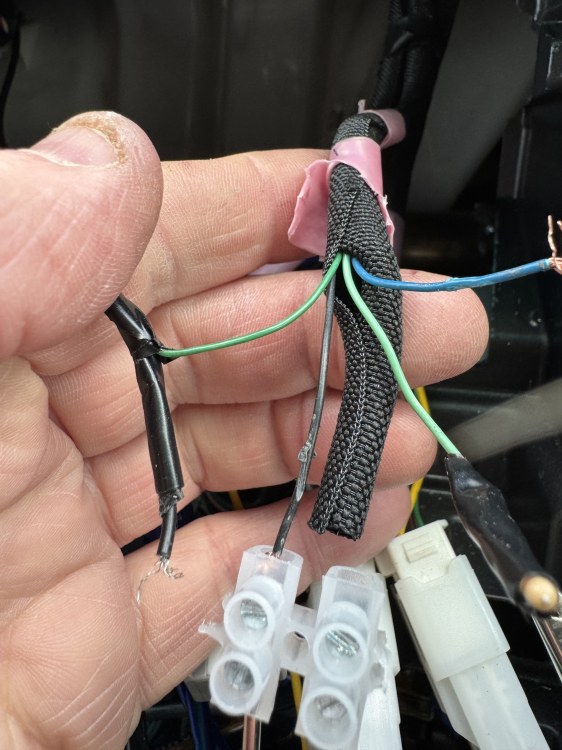
Hi, does anyone know which are key1, key 2, I assume black is the ground.
-
Just took front door panel off and got a nice surprise, Alpine 6.5 fitted (FT17S) with the tweeters in the dash so don’t think I’ll bother changing.
-
GGH20W
-
Is there some sort of inline crossover built in that splits the frequency for the front doors and dash mid/tweeters? Just not sure if I can replace with coaxial 6x9’s
-
Well after having a good dig about looks like I can use a standard Toyota iso adapter to install the Pioneer. Discovered why the original unit sounded so awful, all bass had been redirected to subwoofer but here isn’t one installed, doesn’t sound half bad now.
-
So after having good look round I only actually have 6 speakers, dash, front doors and rear doors.
-
-
Does anyone know how the original 8 speakers are wired? Not sure how 8 speakers were connected to a 4 channel amp??? Will be pulling the stereo out on Thursday to check wiring.
-
I've bought a Pioneer DA 130b to instal Thanks. So far have ordered a Pioneer da 130dab, a set of Hertz 6 x 9 for the front doors and a 4 channel Pioneer amp, I currently have the same Pioneer set up in my 2003 MNH10 and it's decent - was very to install with Toyota adapter cables.
-
Just bought a 2011 Vellfire, it originally had an Alpine x08s system which, unfortunately, the dealer replaced with a crappy double din no-name unit. Looking to upgrade speakers as well, does anyone have a wiring diagram and details of speaker sizes that may help? There's also an Alpine screen in the rear although I don't think I'll bother trying to get that working. 2011 3.5 Gold model - GGH20 Thanks in advance.