Gamith
Members
-
Joined
-
Last visited
Everything posted by Gamith
-
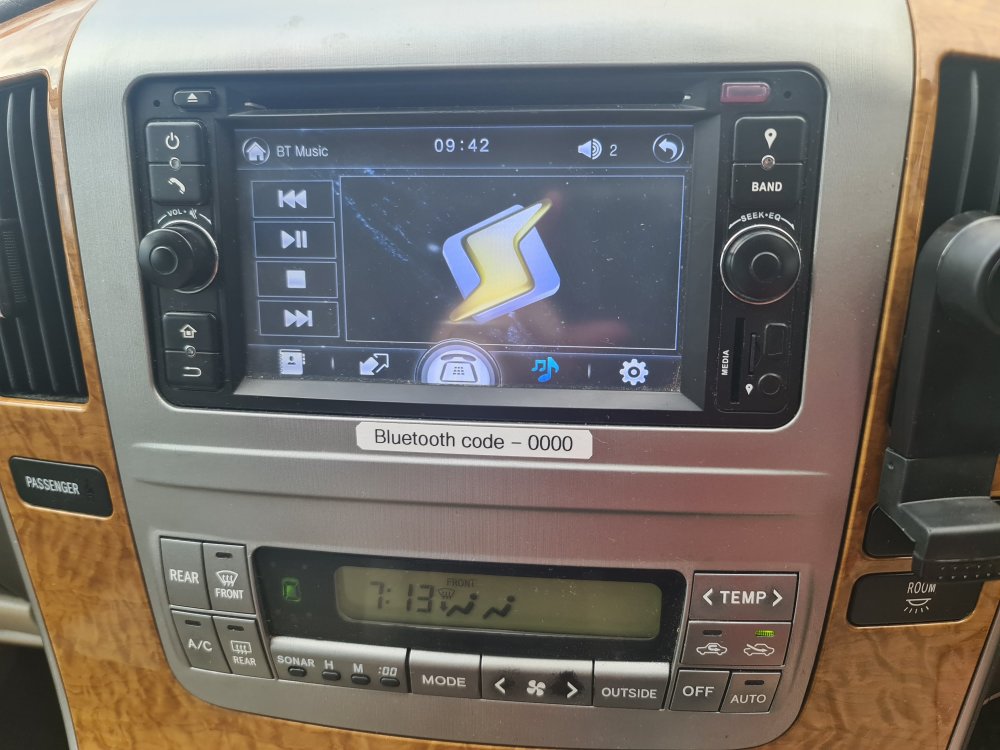
I'm new here so hopefully someone can point me in the right direction. I have just bought my 2004 2.4l with camper kit and I have been looking at the entertainment system which, according to the small media cards contents, is running iGO8 (igo8-8.3.5.193799-world.EXE) and I assume it's a WinCE version. I have been able to change the time and region, though BST / daylight savings seems to elude the settings. Another of this mornings successes is re-tuning the radio defaults 🙂 My questions are: Are there any (ideally free) map or OS updates available and if so where from please? How can I change the name of the bluetooth connection from 'Car Kit 30' to something a little more useful like 'Toyota' or 'Alphard'?
-
Hi everyone, I have just picked up a 2004 2.4 Alphard with camper kit installed. My first drive was today from South London, where I picked it up, to Stevenage, where I live. It took me a while to work out that the camper kit had shifted but after a tweak the boards slotted in Ok. I have spent the rest of the day pouring over the various buttons and switches to see what it they all do. I was a little bemused to have the wing mirrors unfold themselves when I started the engine - a feature I wasn't expecting. I looked in the manual and found that the 'fold mirrors' button was too worn to make out the icon 🙂 I wonder how many other features I will find. It's done 167220 Km. the previous owner was a camping hire company and I have MoT and work invoices (mostly services) going back to 2018. There are some cosmetic scrape and scratches which I am not too fussed about - is there anything in particular I should check? Cheers Paul I could post some pics I have taken but I would imagine you know what one looks like :-)