
Chris.ac
Moderators
-
Joined
-
Last visited
Everything posted by Chris.ac
-
yeah, i was going to use a regular copper plumbing t piece, the parts are common enough, so direct through toyota dealer may be your best bet, otherwise online.
-
the diagrams do not refer to removing the surround expect when removing the entire roof lining - maybe if i look under the heating system diagrams! give me a moment. edit: nope, cannot see a drawing showing how to remove the vents themselves, bizarre.
-
Had this happen on my older Regius. It was during lockdown, so never bothered fixing it, I just bypassed it and drove without any heating, but it should be a simple case of replacing and refilling coolant
-
Disengage the top clips, highlighted in circles, the bottom ones (highlighted in rectangles) are the claws that sit deeper (act as the hinge)
-
vellfire and alphard are the same drivetrain and chassis, its just the styling of the lights and bumpers and some trim/colours that differs
fuse boxes are listed in the 'relays' wiring diagram
All wiring, fuses, relays here: https://cardiagn.com/toyota-alphard-vellfire-em08z5e-wiring-diagrams/
I have a mate that got me to drive his audi, whislt he pressed his head against various panels, including leaning out of the window at one point because of some minor resonant vibration, bloody nightmare, lol
its a paper cartridge that goes into the oil filter holder, rather than the throw away can type. Attached pdfs 2gr oil prep.pdf 2gr oil filter removal.pdf 2gr oil filter location.pdf
yeah, I bought a box of several hundreds plastic trim clips and hunted down any damaged ones - the only rattles and squeaks i have now are from things i have rubbing and moving in the various pockets or door storage
on my regius, which had similar strut setup to the gen 1 alphards, I didnt touch or grease them in the 7 years I owned it. I would say that the white grease itself is the cause of the groaning, as it has dried out.
in this case: http://fsm.japanclassic.ru/toyota/2002.5_7a037_alphard_anh1,mnh1/x339/servinfo/x339i0307000123_base.html Either the 10A 'Gauge' fuse is blown, or there is some problem in the grounding path for the Cigarette lighter/illumination circuit
But if hazards work, it would seem to isolate problem to the switchgear; did you add steering control interface or interfere with the steering wheel wiring during your install: Common path on the W-B wire at J/C (No18) If you disturbed wiring beyond that, you would have had to interfere with both the L (Blue) and L-W(Blue-white) wires, otherwise you wpuld be able to indicate at least one way or the other
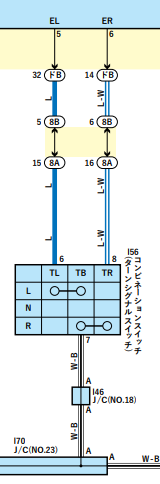 You want your electrician to check the o/p for the highlighted pins
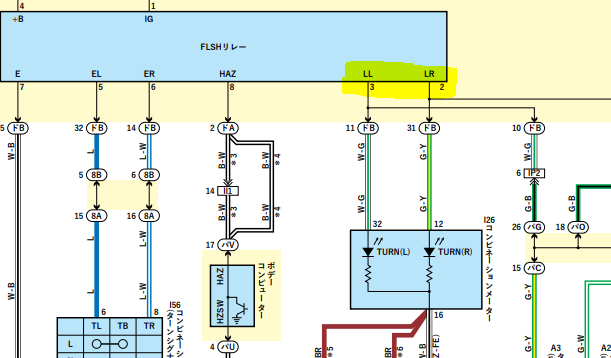 Hazard switch highlighted on the right, stalk for indicators on left
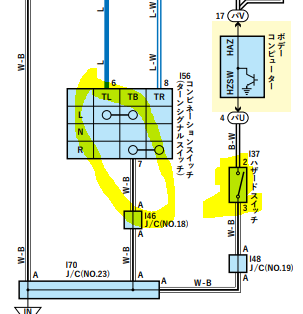 when fitting the android unit, did you splice in to any wiring? attached wiring diagram for the hazards/turn signals, you may have shorted something to ground on the indicator side, the hazard feed is seperate. http://fsm.japanclassic.ru/toyota/2002.5_7a037_alphard_anh1,mnh1/x339/servinfo/x339i0307000423_base.html
yeah, this combo is for Gen 2, you cannot use it whilst using radar cruise, I imagine all sorts of calibration/monitoring and brake/accelration control is built in to the additional ECU that interprets radar distancing data against the visual imagery from the Lane assist camera setup. A choice needs to be made as to an increased limit for cruise, or self adjusting for distance in traffic flow.
isnt there some app on iphone that lets you use the cameras to take a 3d model image of an object - is there a way to use this to create a file compatible with a piece of software?
https://toyota.epc-data.com/alphard/ath10w/32238/electric/8611/
looks nice, but i really like the functionality of the original cameras, they are perfectly calibrated for reversing into spaces and kerbside parking, and the guidelines work flawlessly.. SO we need a modern HD screen like this, but with the inputs for the OEM parking assist ecu.
No problem Rojie. always glad to help if possible
definitely 'break out' boxes that are detailed by asterixis in the drawings dependant on the trim level of the vehicle, for those dampers. Did your old dampers have a letter marking? you look it up in this box and it tells you the type of damper you need. There are ones for cold weather region alphards, and ones for power doors. So maybe subtle differences in pressure which may explain why they are not holding the door up as far? On my old regius I would occasionally almost scalp myself because the door didn't extend fully in the cold. I dont think its the motor, that is only required to get the door to the critical point where the pistons take over
when fitting the android unit, did you splice in to any wiring? attached wiring diagram for the hazards/turn signals, you may have shorted something to ground on the indicator side, the hazard feed is seperate. http://fsm.japanclassic.ru/toyota/2002.5_7a037_alphard_anh1,mnh1/x339/servinfo/x339i0307000423_base.html
yeah, this combo is for Gen 2, you cannot use it whilst using radar cruise, I imagine all sorts of calibration/monitoring and brake/accelration control is built in to the additional ECU that interprets radar distancing data against the visual imagery from the Lane assist camera setup. A choice needs to be made as to an increased limit for cruise, or self adjusting for distance in traffic flow.
isnt there some app on iphone that lets you use the cameras to take a 3d model image of an object - is there a way to use this to create a file compatible with a piece of software?
https://toyota.epc-data.com/alphard/ath10w/32238/electric/8611/
looks nice, but i really like the functionality of the original cameras, they are perfectly calibrated for reversing into spaces and kerbside parking, and the guidelines work flawlessly.. SO we need a modern HD screen like this, but with the inputs for the OEM parking assist ecu.
No problem Rojie. always glad to help if possible
definitely 'break out' boxes that are detailed by asterixis in the drawings dependant on the trim level of the vehicle, for those dampers. Did your old dampers have a letter marking? you look it up in this box and it tells you the type of damper you need. There are ones for cold weather region alphards, and ones for power doors. So maybe subtle differences in pressure which may explain why they are not holding the door up as far? On my old regius I would occasionally almost scalp myself because the door didn't extend fully in the cold. I dont think its the motor, that is only required to get the door to the critical point where the pistons take over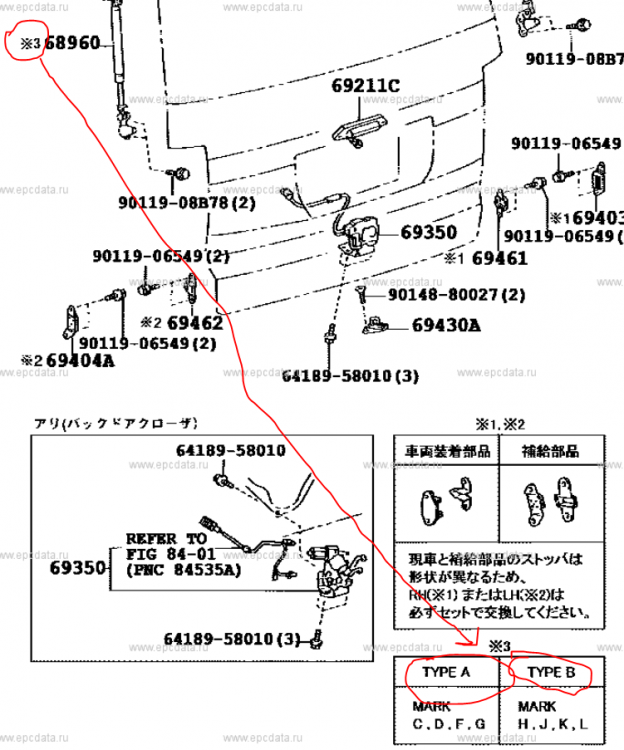 no power boot for me, also the chassis base is different for the 10 vs 20 series, so I imagine the mounting points are not in the same location. I wonder if the offline official toyota EPC will give you a more accurate part number vs the online tools
'mechanic not sure' - sounds like hand rubbing and pound signs! A quick fix - do not break the 70mph speed limit! haha
no power boot for me, also the chassis base is different for the 10 vs 20 series, so I imagine the mounting points are not in the same location. I wonder if the offline official toyota EPC will give you a more accurate part number vs the online tools
'mechanic not sure' - sounds like hand rubbing and pound signs! A quick fix - do not break the 70mph speed limit! haha




Important Information
We have placed cookies on your device to help make this website better. You can adjust your cookie settings, otherwise we'll assume you're okay to continue.