Chris.ac
Moderators
-
Joined
-
Last visited
Everything posted by Chris.ac
-
Ooh. You have the Malaysian headunit that has English language. The dual button on the rear screen allows you to have separate source between the front seats and the rear, including splitting the audio so the front 8 speakers are used for phone call, radio/music, and the rear 10 for the dvd etc. Your interface is slightly different to mine,, but there should be an option on the headunit to select video source
-
What switch is fitted in the position where the folding mirror switch should be? Please post photo of the switches either side of the steering wheel. It's possible, a previous owner in Japan moved the physical switch behind the dash panel in order to free up the slot for something else. The fact your mirrors appear to have motors means there should be the wiring and therefore the switch in place. There are 3 mirror types. One is completely manual ( only has control for adjusting glass) One has fold and unfold via motor and a rocker switch. One has motor and rocker switch with an additional auto position. It's possible you have the second option, and an aftermarket module that uses the central locking signal to logic switch between the open/close states. To determine if you have the 2nd or 3rd option, check if you have auto tilt mirrors. With vehicle in reverse gear, flip the mirror adjust button ( the left right toggle between the center neutral position and either left or right. In the center position the mirror should be as normal, when moved to the left or right, the mirror will automatically adjust so the mirror tilt down to show the road.
-
Could you share photo of the rear screen, to be sure it's the original or aftermarket?
-
Do they work from the actual doors handles? If not, have you turned them off from the button on the dash?
-
No. If the etc unit is disconnected, the only thing it would be is the headunit itself. Are you sure it's the etc beeping? What is on your windscreen? Could you record the beeping sound?
-
Look for a sticker, often on the rear glass, that shows the eco compliance year. If it says 2002 or earlier, you are out of luck. If it says 2005 ( some earlier Toyota complied to the later proposed standard) then you essentially have a euro 4 compliant vehicle. This is why the later 10 series are ulez compliant, whist the very first years of production are not.
-
I think you need to remove the entire panel
-
Watch this for info.
-
What fuel are you using? Are you using premium (97 ron+)? You don't need premium in the 2.4l, its used for the v6 engines that have higher compression, in order to perfect pre-ignition. Maybe you have lower compression than normal which is causing the fuel to ignite far too late and causing such poor power generation.
-
You have a link for the service pack?
-
Here's a video by carcarenut (Toyota specialist on YouTube) that explains the entire brake maintenance. Pins are around the 16min mark. You'll notice the pins are like you show. One has the rubber collar. He has many videos, and it's extremely knowledgeable on Toyota and lexus
-
You have a 20 series hybrid or a 3.5l V6? Quite a lot of difference.
-
Dashboard illumination. So that the switch icon lights up with the other switches on the dash.
-
Honestly, buy Toyota shims. Toyota do brake service kits that have the shims. I'm still using the original, which are designed to last the lifetime of the vehicle. Some owners throw out the originals if shims are included with pads, that's usually a mistake!
-
The bulbs are listed on the top of the headlamps. Embossed into the frame. Eg. On my 2010 Alphard, the high beam are hb3 And the dipped are d4s
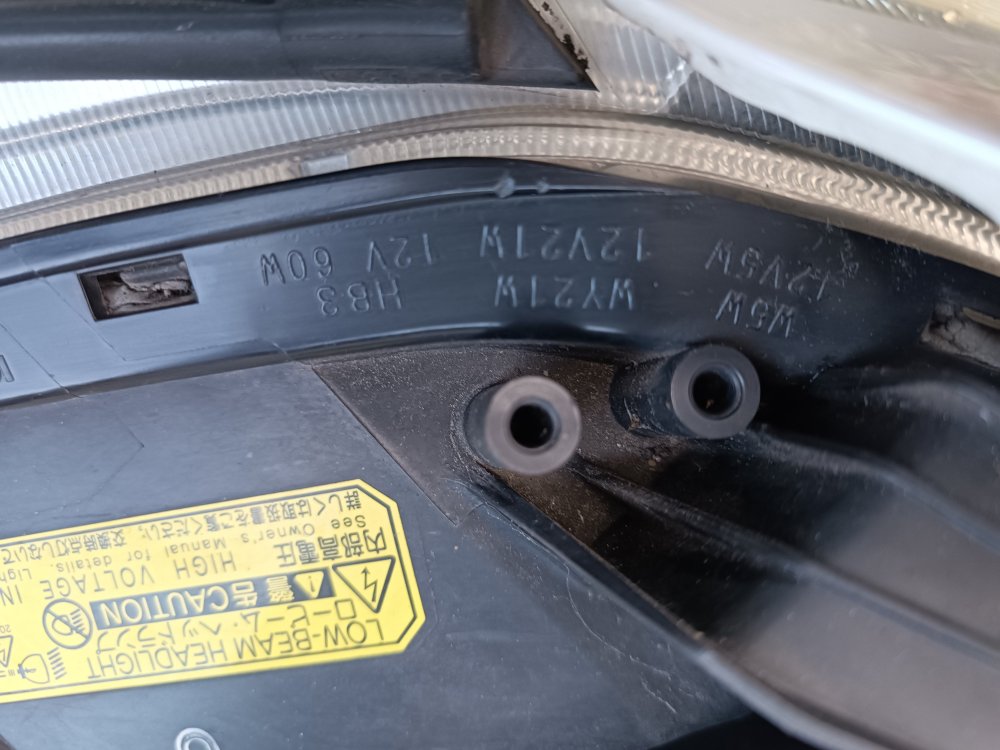
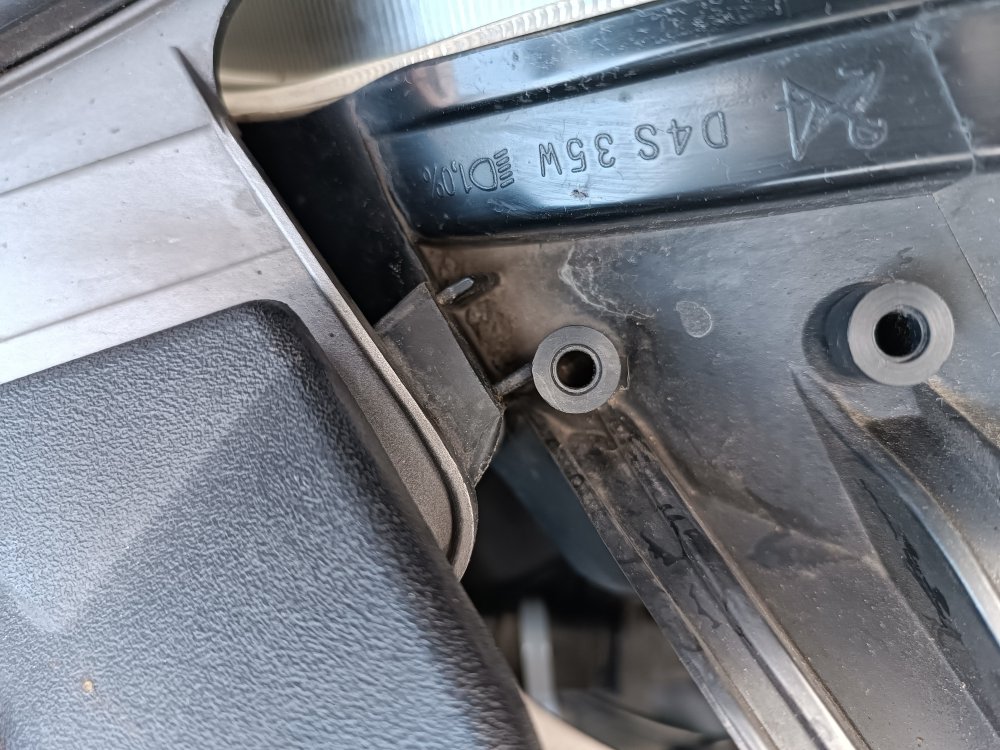
-
Could you take photo of your dash? If it the newer one that has a display with a navigation menu?
-
Not seen this, makes sense because the speed limit in Japan is 60. Maybe it is configurable via the obd2 port using techstream
-
I don't have the 10 series cdrom, you need to ask Atlanticcobra2023.
-
Yep, i removed bumper, removed reflectors, and fitted foglights in my lunch break. Took less than 30 mins, and I'm not a mechanic.
-
I have the same error code. I've not gone any further to investigate. There is a section on the ac in the maintenance manual, but the website is offline at moment. I'll try and post it here later. I've also gone back and corrected the typos, using a mobile keyboard and it likes to auto correct incorrectly.
-
I'm pretty sure it's the same process, this seems to be a Toyota standard from early 2000s
-
The clean icon is just part of the climate controls, every 10 mins it will activate the Ioniser to curb the door, clean just means it completed that cycle. Here is a helpful PowerPoint doing so the electrical systems in your 20 series. https://slideplayer.com/slide/10248235/
-
If you want to try without waiting, this video does the steps, ignore the fact it's not same Toyota or headunit, the exact same process works. Press start button twice without brake pressed ( so it didn't start) hold auto and recirculate mode button, then start vehicle. Everything should flash, then press the circulate button for it to run through all the tests, it will count up from 1. Once it cycles to 1 again, press the auto button and your error codes will be displayed
-
Yes. You can get an error code displayed and a test of the systems without connecting anything. I'm just shopping at moment, but give me an hour and I'll let you know which buttons to press, it should be holding the auto and recirculate button whilst car is in ign mode, but I'm confirm. It will then cycle through all the motor and airflow settings and climate mode switching and present a code where the temperature is usually displayed
-
I can't because your email address is not a Google one, if you could pm me an email address that is compatible, such as yahoo or Gmail, i will add you