Chris.ac
Moderators
-
Joined
-
Last visited
Everything posted by Chris.ac
-
Is it still doing this? I ask because, when in in London, there's a particular shopping car park that my alphard will refuse to work with the fob. Even the door lock unlock sensors will not work and i have to manually use key. I think there is some jamming technology in the area.
-
18 speaker system will have an amplifier that requires a 'MOST' adaptor to convert the output from most android units to a digital signal (some sellers call this an optical box, which it isn't) The roof monitor can be controlled from the headunit, it also has audio fed from the amplifier, which can make some setups difficult, the screen itself has a motorised flip, which is a signal from the headunit, so it worst case, you could wire a switch to operate it, although the resolution and screen size is poor, so maybe you'd upgrade this to a standalone unit? The rear only camera is simpler to connect, it does use a 6v supply, but converters exist that provide 6v from the standard 12v wiring. Again, you may be better buying a system that has 360 cameras in the kit, as these will offer a higher quality image.
-
Alternatively, try from a scrapped estima, previa or landcruiser
-
£100! No. Just no. Buy it from amayama. For 20 series https://www.amayama.com/en/part/toyota/8414042080 Even the 30 series is a similar price.
-
Do you have sunroof? If so, check roof lining for 6 speakers, 2 at rear row and 4 between driver and mid row. If so, you have the 18 Speaker system that has a 16 channel amplifier under passenger seat. Does it only have rear camera? No front or side one? Do you have roof mounted monitor? Fyi a 3.5l is actual MODEL GGH20.
-
https://a.aliexpress.com/_EQaR8 For android mobile, the dual PCB one for£3.70.
-
I've bought one from eBay and AliExpress, both under £10. I'll pm you the AliExpress link. The link i shared is s common design, but be aware that not all of these clone devices are jobd, the link i used has an older design with dedicated daughter board inside. I cannot vouch for the newer single board designs.
-
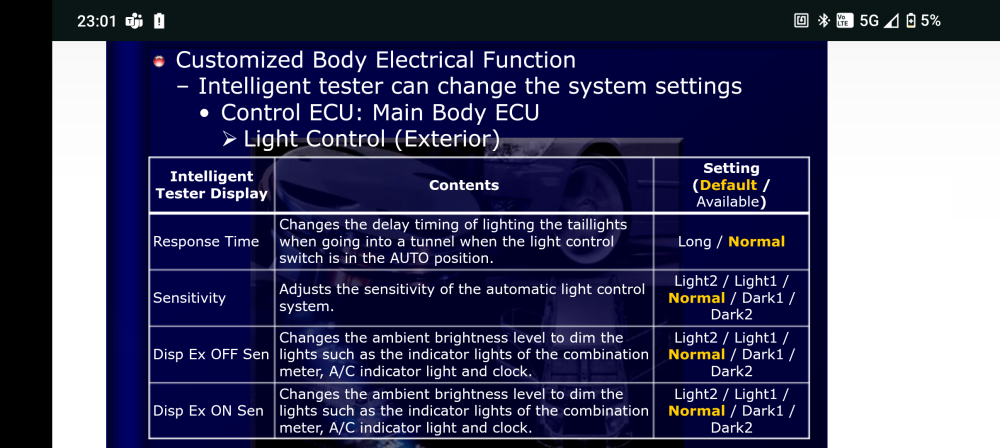
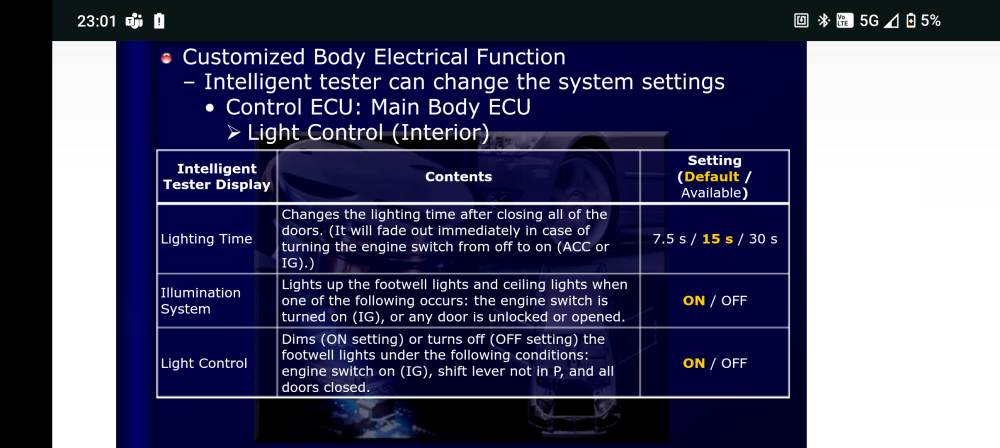
https://slideplayer.com/slide/10248235/ Contains all the customisable functions in the 20 series. Lights, Aircon, windows, doors, buzzers.
-
Light settings are listed in following images.
-
Techstream, or the Android/apple app 'car scanner' with a Bluetooth obd2 dongle will allow you to adjust the delay before lights turn on or off, there is also 5 sensitivity settings, although those seem to have very little effect.
-
Depends on what model you have. Is the etc box in the little coin box on the right side of dash? If so, just keep pressing the volume down button that is on it, until it mutes.
-
Depends on what you are willing to pay, and what you want. You can have standard usb, or the newer usb c. Here's a cheap one that does not require you to cut wires, you remove the plug from cig lighter and it connects in parallel. For Toyota Car Dual 2 USB Quick Charger QC3.0 Power Adapter Socket 12V Outlet https://amzn.eu/d/hIFKyGY
-
I've seen the official instructions from the usa for this paint recall, it advises using packaging tape to 'pull test' the adherence of the paint, along the edges of the peeling until you get to a solid bond. https://static.nhtsa.gov/odi/tsbs/2019/MC-10170718-9999.pdf
-
No problem. It is quite intimidating at first, as the amount of force required seems like you will break something. The only trim you need to be careful with, it's the wood effect trims, the tabs are quite brittle, so using decent tools is required.
-
They offer shipping to UK. Also I've seen UK based that offer similar service
-
VID_20240830_110241328.mp4
-
Yeah, i need to do mine, plus the paint between windscreen and sunroof. I did find colour matched wrap, bit not used this, not sure if it's as they state. https://www.colorxlabs.com/products/color-match-wrap-vehicle-wrap-that-matches-oem-paint-color
-
In a few hours i can post an image or video clip, if you can wait
-
Not required on 20 series, the button is captive.
-
Oh. I don't recognise either of those units, so both aftermarket. I can't help personally, so hopefully others here have experience with them.
-
Good job, and thanks for the instructions for accessing the pins on the steering wheel connector, for those not changing stalk. On my reflector lights, there is a dim setting, which i keep meaning to connect to my front driving leds, so that i always have illumination up to the point the auto headlights kick in. At least your fog is visible, the one the dealer fitted to mine was the size of the reverse sensor, and was drilled through my reflector to attach. It was literally a single led that provided as much illumination as the switch on the dash. I couldn't wait to tear it out. I was going to go with LEDs in the towing covers, too, originally.
-
Are you trying to play movie on front screen? Standard Japanese regulations mean it won't play on funny screen of the car is moving and parking brake not on. You can bypass this, but it involves cutting 2 wires, you can either wire them permanently to bypass safety Freddie on headunit, or fit switch like many alphards seen to have fitted aftermarket
-
Is this one of those parts where taking the code to Toyota and getting then to order it on ends up being cheaper?
-
Its quite a hard tug you need to give on lower edge, it will seem like you are going to break trim. I grip the storage pocket and hard tug towards you.
-