Chris.ac
Moderators
-
Joined
-
Last visited
Everything posted by Chris.ac
-
It's weird that it happened with keys on side, I'd open fob and check there is no surface corrosion on the circuit board, and check the rubber buttons for gunk, maybe some moisture/condensation built up?
-
Press 1st button top row, press the top right screen button to turn off front display From that screen you can also press the top middle screen icon to open/close roof screen
-
Replied to a previous post on this question
-
I think I mentioned in another thread, that you align them with the mark on the headlamp lens (in your photos, you can see a small round circle on the headlamp glass. That's the beam centre, so glad that aligns with the garage beam adjuster equipment! Might have been on a 20 series post, the 20 series has small dimple marks on the inner surface of the lens.
-
I think I mentioned in another thread, that you align them with the mark on the headlamp lens (in your photos, you can see a small round circle on the headlamp glass. That's the beam centre, so glad that aligns with the garage beam adjuster equipment!
-
in that case, as long as you have an alphard that is not early 2002, you should have plug 'n play CC
-
You have to keep it in context with the year of manufacture. reverse camera had been available since mid to late 90s on Toyota, they then introduced front and side, expanding to 360, by the time 2015 rolled around is when they started installing digital rear view mirrors, and on newer models they now have telemetrics that capture dashcam for use in accidents. The tint, in fairness is a film, so you could use a scalpel to remove a small square of it.
-
Look into the 30series parts, some of these had digital internal mirror that allowed you to either use it 'standard' mode as glass, or switch to the rear camera mounted at top of glass. Alternative would be to get a camera that uses one of the number plate light sources to mount a camera/led
-
only easy on the facelift models as these had electronic throttle - I believe the 2002 has a cable throttle. Someone else might clarify, or you could check you throttle housing and see if it is cable driven
-
-
Not so sure the expansion tank is an an accurate way to gauge, hence its min/max markings. August was particularly good this year, I would imagine natural expansion/contraction due to external temperature may contribute to such a small change.
-
If anyone is interested, alphard is there too. manual.toyota.jp/alphard/ Only 2nd gen onwards, can even get copy of the navi headunit, if you want to see how the reverse cam, auto parking works etc
-
manual.toyota.jp/vellfire/ They have April 2010, and Oct 2011 Manuals. Open link on Google chrome, and use its built in translate to direct the correct manual
-
If you can't find copy, I have a copy on my Google drive
-
You can download official Japanese one from Toyota as a pdf
-
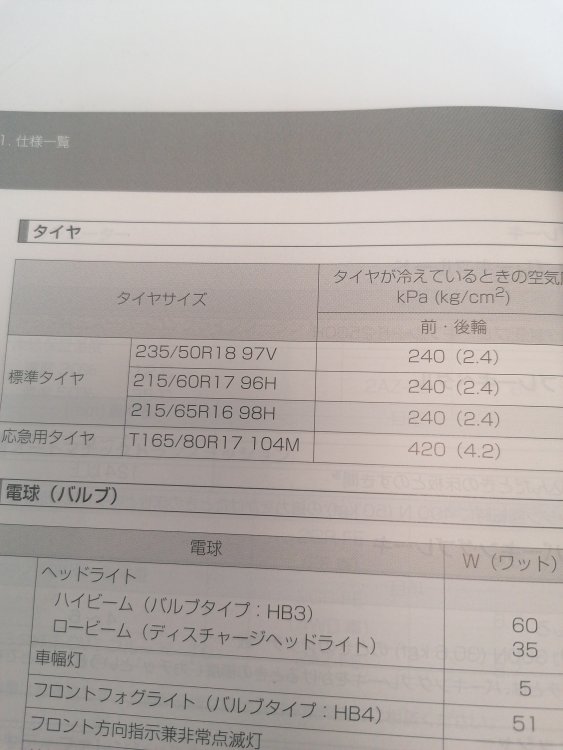
In a bit slow recently, but the official owners manual lists 16, 17 and 18 inch
-
Blimey, got your monies worth out of that component!!! LOL
-
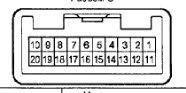
on existing socket - should be able to match these up to SW1 and SW2 on Pioneer
-
pin 6 = Switch Gnd Pin 7 = SW1 Pin 8 = SW2
-
Link? This size socket is not the same as the front ones, is it more like the shape of the 10 series switchs
-
-
-
It is a 3 way cigarette lighter socket. It's probably wired into the existing cig socket.
-
-